Ai Dream Studio.
Making AI creation approachable for everyday users.
Sole ownership · Design / Full-stack development / Deployment / Launch

AI-generated project artwork based on supplied interface and brand references
01 / DEVELOPMENT JOURNAL
From planning products
to building one.
Ai Dream Studio is the first product I independently developed with AI coding tools. My earlier work centered on experience design, product planning and team delivery. This time, I wanted to turn an idea into something people could actually use and take responsibility for the entire journey to release.
I independently completed frontend and backend design and development, server deployment, qualification applications, platform review submissions and launch. My tools evolved from Trae to Cursor to Codex, while product decisions, experience trade-offs, validation and delivery remained my responsibility.
- Ownership
- Design / Build / Deploy / Launch
- AI coding tool journey
- Trae → Cursor → Codex
- Product
- WeChat mini app + Admin console
- Stage
- Live · Ongoing iteration
THE PRODUCT IDEA
AI creation for people who do not write prompts.
Traditional image-generation tools ask users to describe the result in detail, making prompt-writing skill a significant part of the outcome. Ai Dream Studio combines refined prompts, example images and editable variables. People start with a result they like and create through a few choices and a personal reference.
- 01Choose an example
- 02Adjust key options
- 03Add a reference if needed
- 04Generate, save and use
02 / PRODUCT FEATURES
Nine decisions behind the product
From getting started and completing a task to improving the live product.
01Make creation approachable
Put specialist knowledge into templates and clear choices in users’ hands.
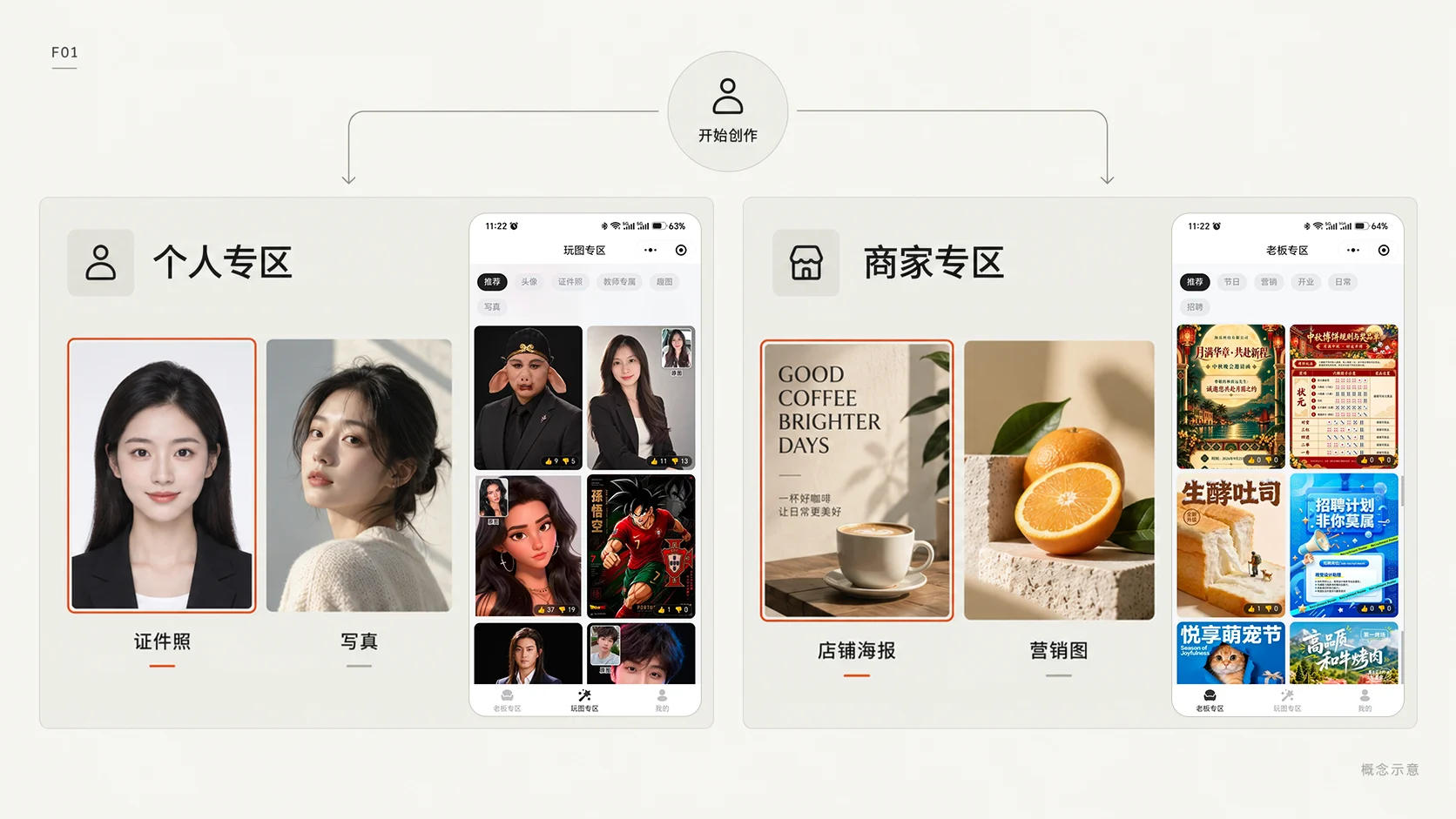
FEATURE / 01
Separate entry points for different needs
- Separate personal creation from business imagery.
- Personal templates cover ID photos, portraits and avatars; business templates address shop posters, marketing and commerce visuals.
- Start with a recognizable use case, then a creative choice, reducing aimless browsing through a large catalog.
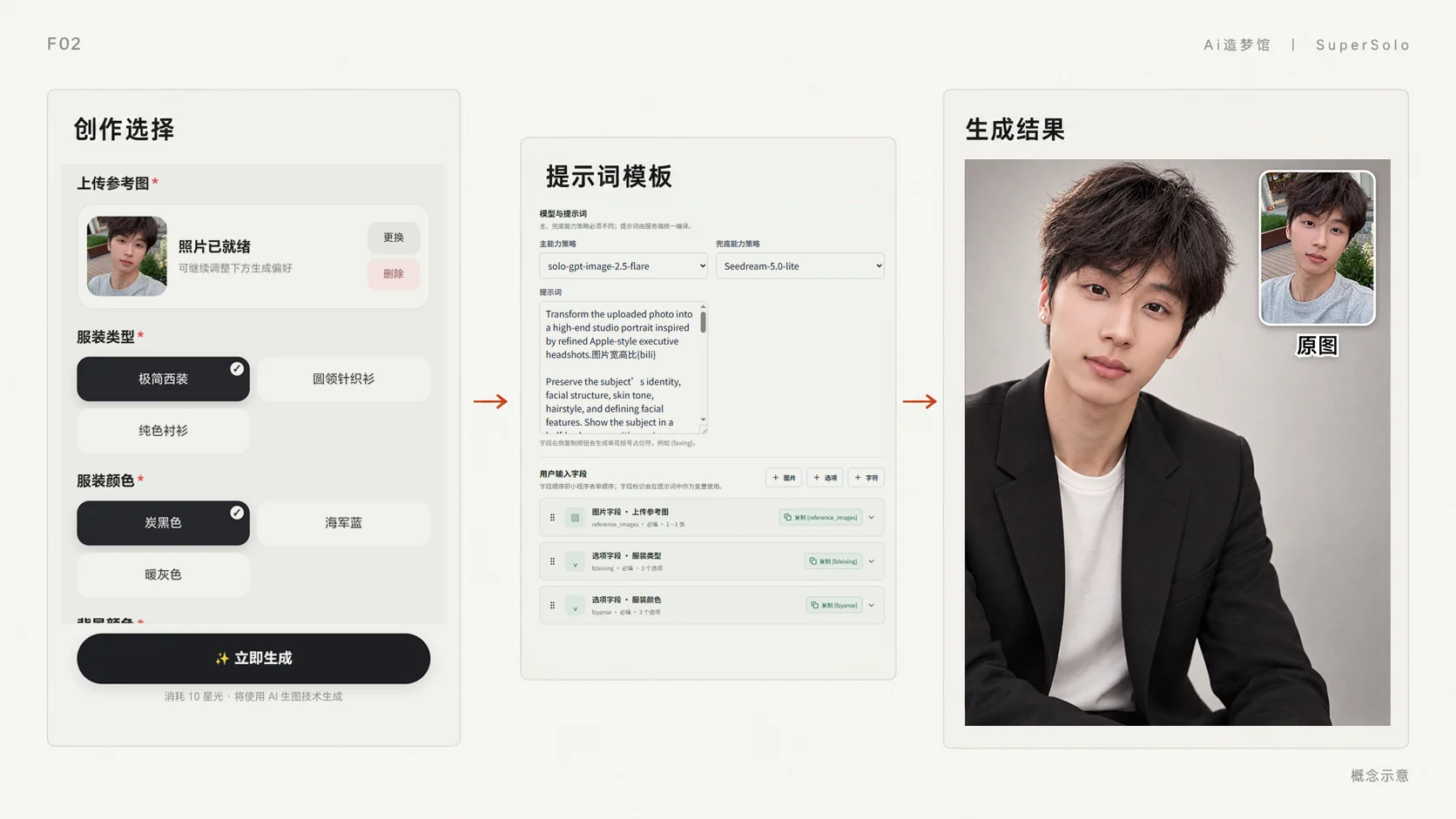
FEATURE / 02
Turn complex prompts into simple choices
- Package refined prompts as templates with variables and input fields, supporting text-to-image and image-to-image workflows.
- Users choose relevant options such as clothing, background and framing, or upload a personal reference.
- Templates handle the specialist description while users retain personal choices. Example images make the intended result easier to understand.
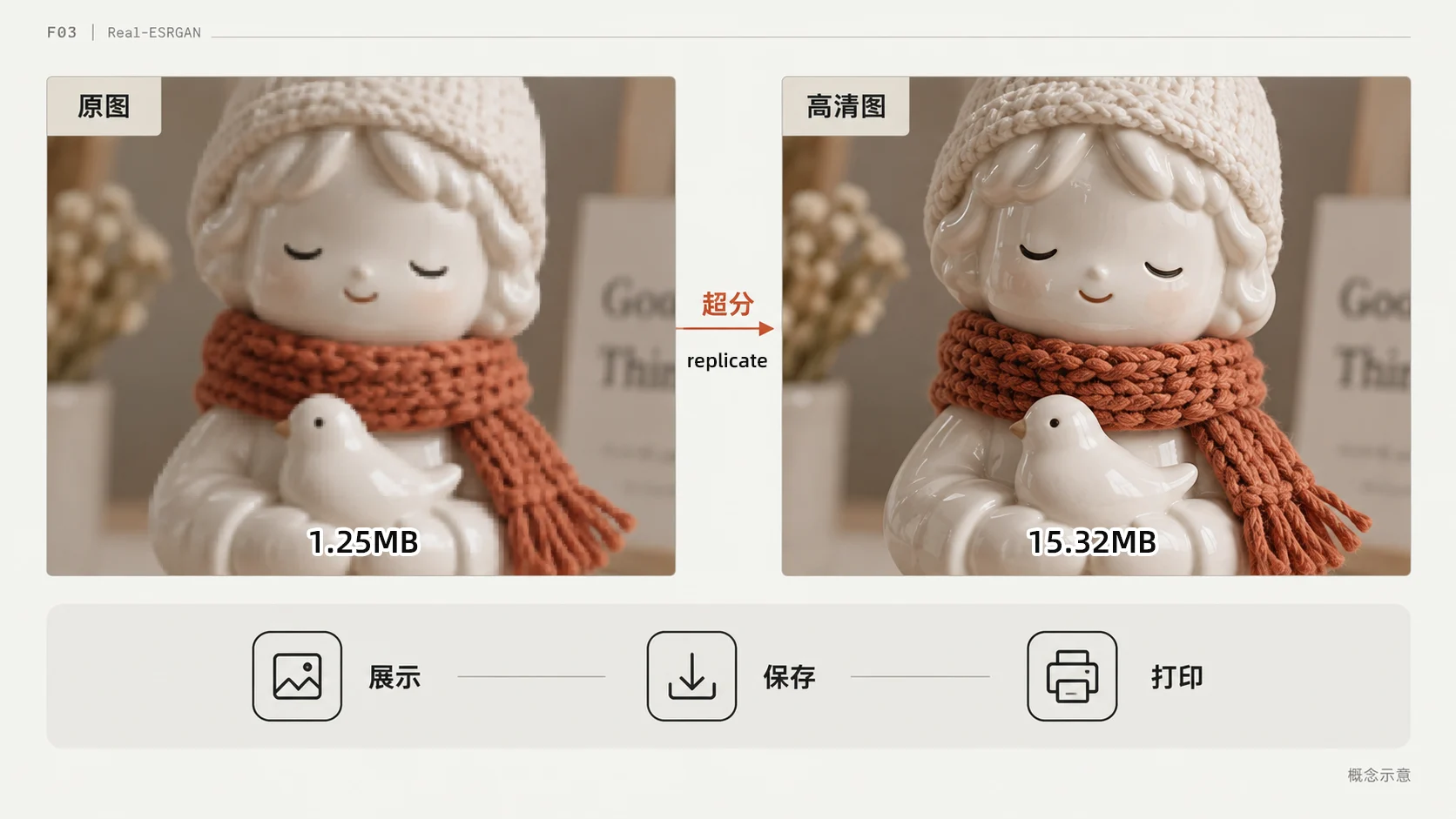
FEATURE / 03
From generation to high-resolution output
- Integrate image upscaling for saving, display and print use, with separate original and high-resolution output paths.
- The implementation uses Real-ESRGAN and handles task state and point refunds after failure.
- The experience continues beyond generation to how people receive, save and use the result.
02Complete the creation experience
Connect discovery, waiting and return visits with a clear next step.
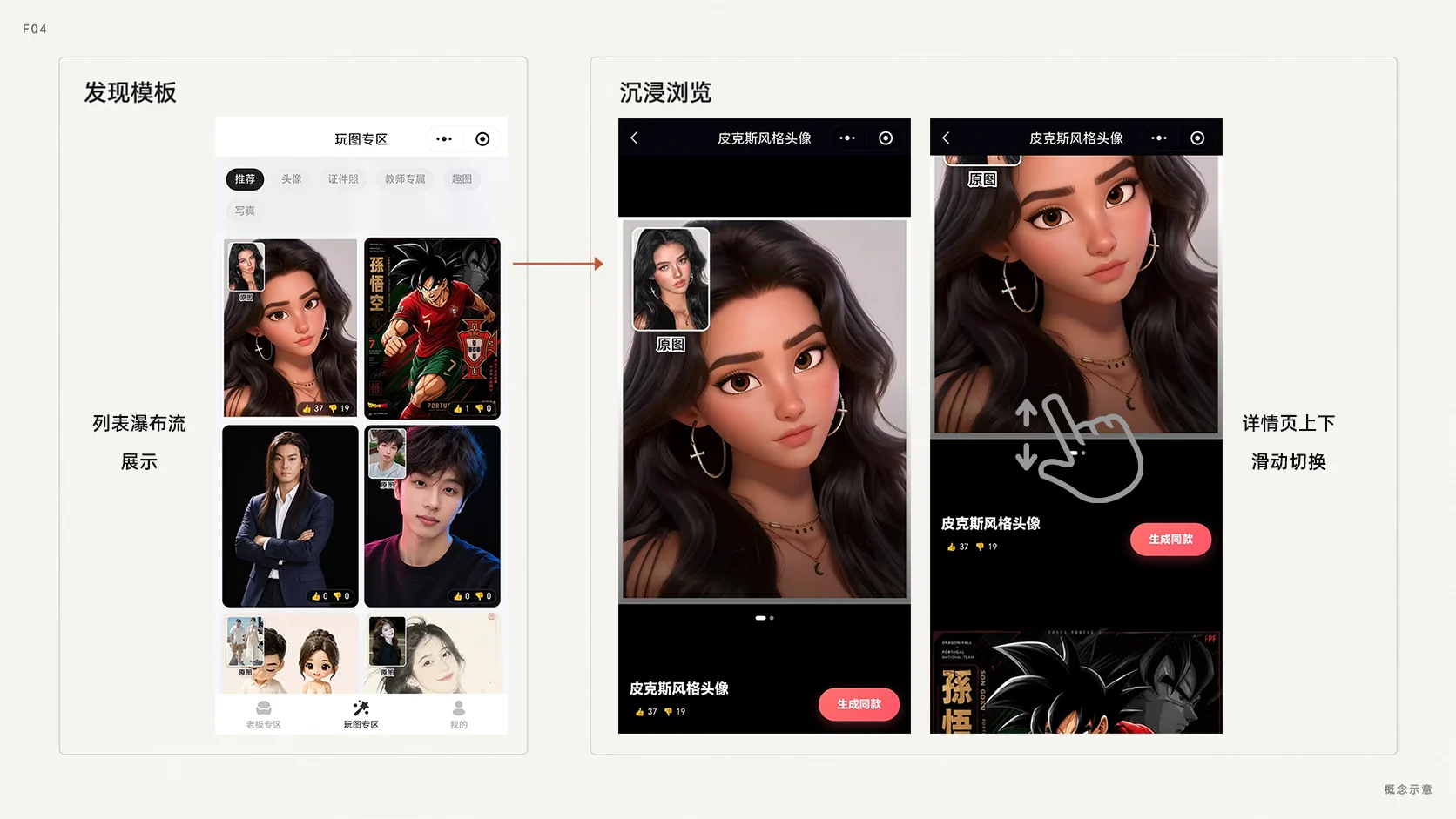
FEATURE / 04
A visual feed with immersive browsing
- A masonry feed presents example images across subjects and proportions so users can discover templates visually.
- Detail pages prioritize large images and bring uploads, options and generation into the current task.
- Show what can be made before asking for inputs, connecting browsing with action.
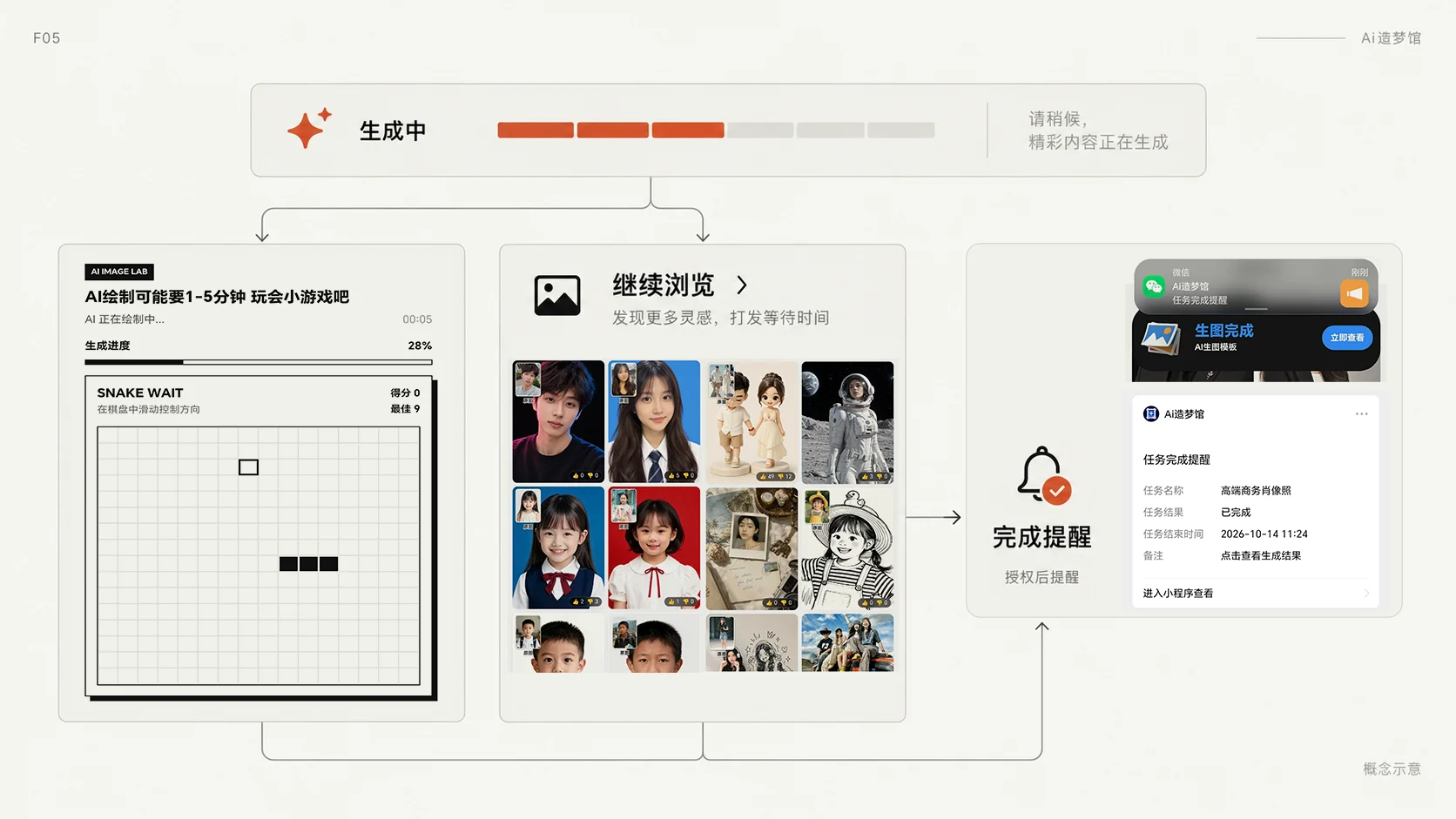
FEATURE / 05
Waiting without getting stuck
- Add a snake mini-game and task feedback to the waiting screen.
- Users can also browse other templates while generation continues and return through an opt-in completion notification.
- Make waiting a choice: stay and play or keep exploring, with a route back to the result.
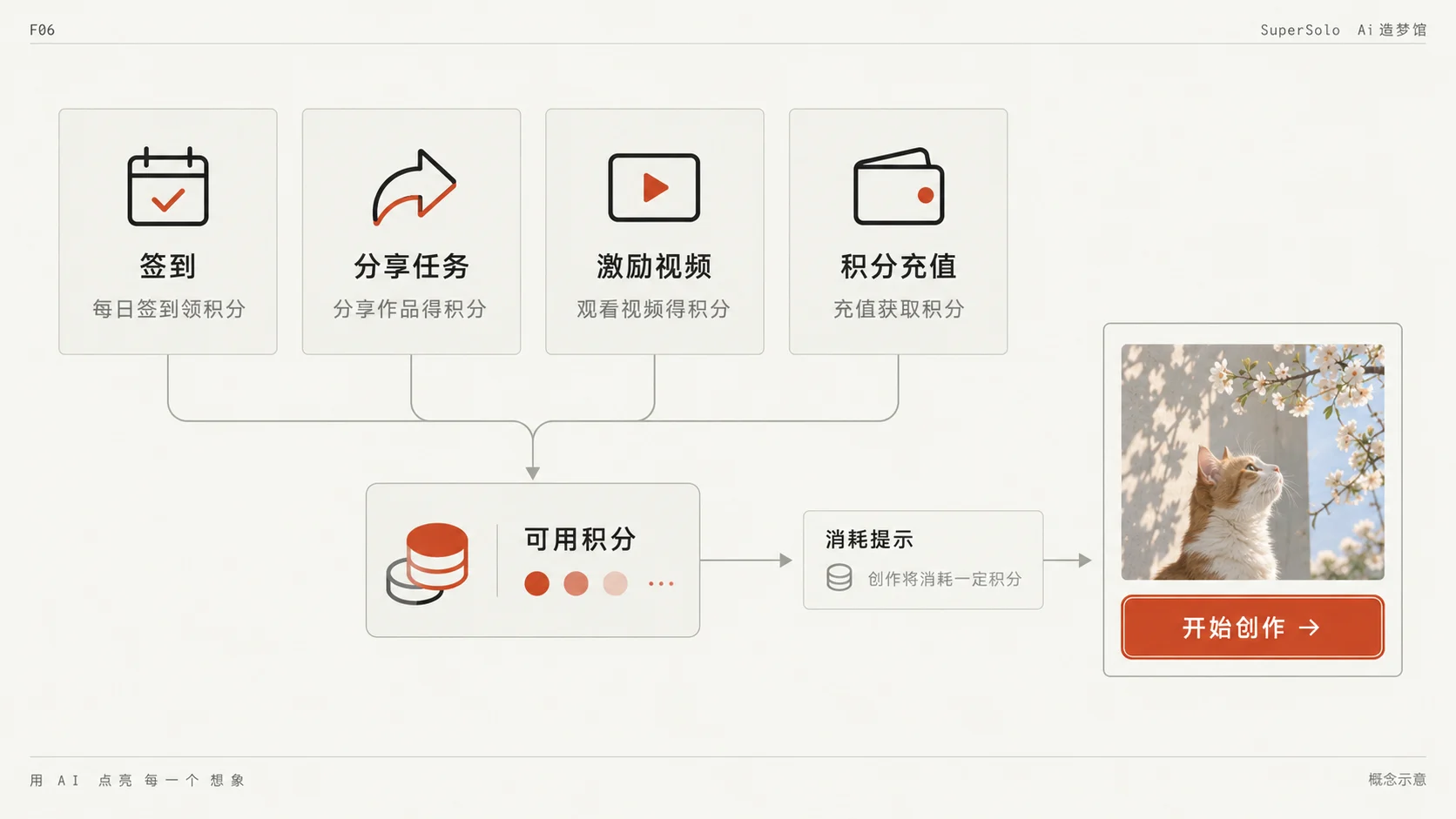
FEATURE / 06
Point options for different usage patterns
- Offer point top-ups for recurring image needs, while casual users can earn points through check-ins, sharing tasks and rewarded videos.
- Connect cost information, available points and the generation entry point.
- Let people choose an access path that suits their needs and habits, reducing friction for a first try.
03Build for ongoing operation
Deliver results while making problems visible and improvements possible.
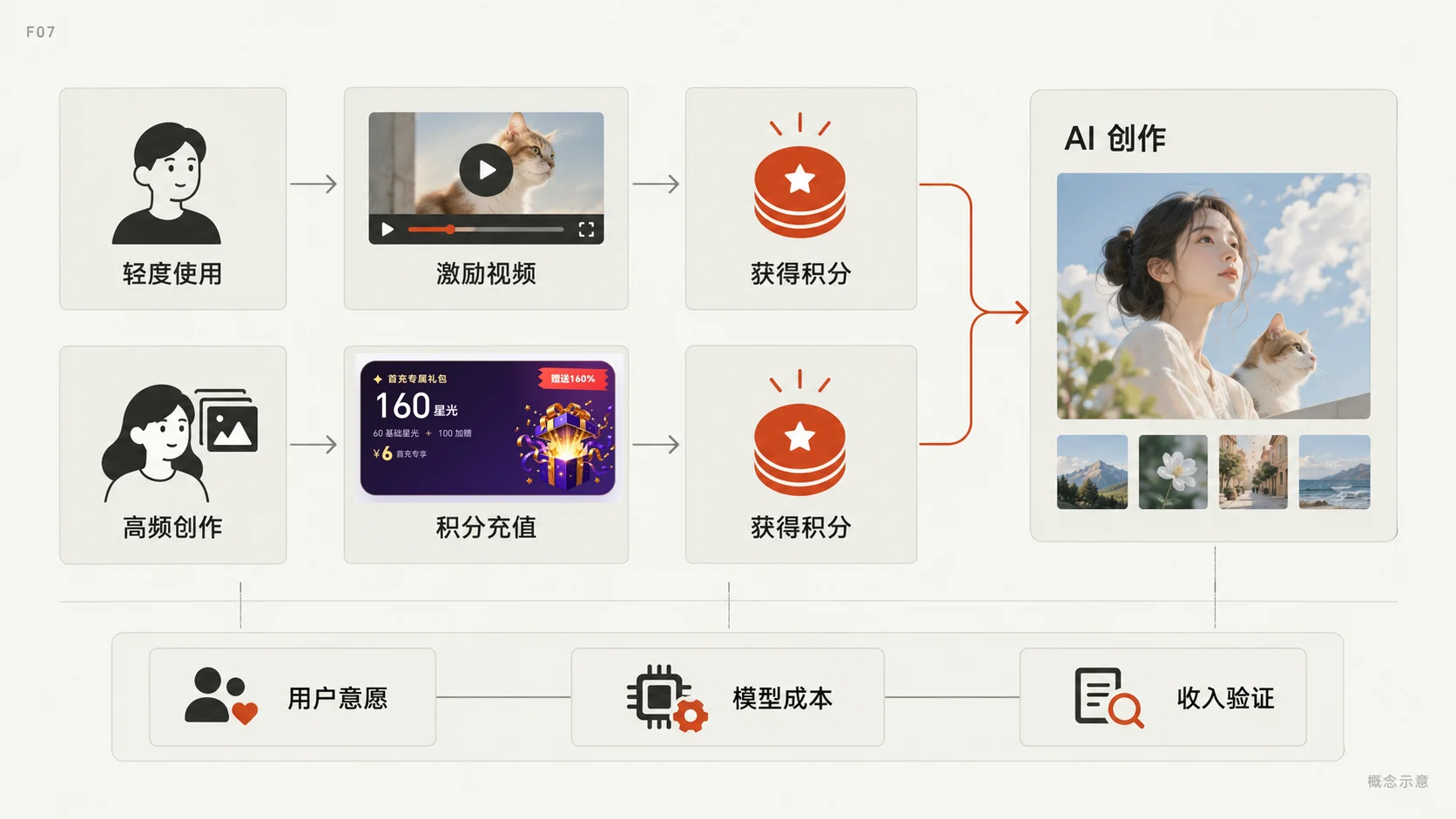
FEATURE / 07
Explore revenue through ads and top-ups
- Combine in-app advertising with point purchases: rewarded video supports casual use, while top-ups serve more frequent creation.
- Different usage patterns have different payment paths.
- Monetization is part of the product flow, with willingness to pay, model costs and revenue still being evaluated.
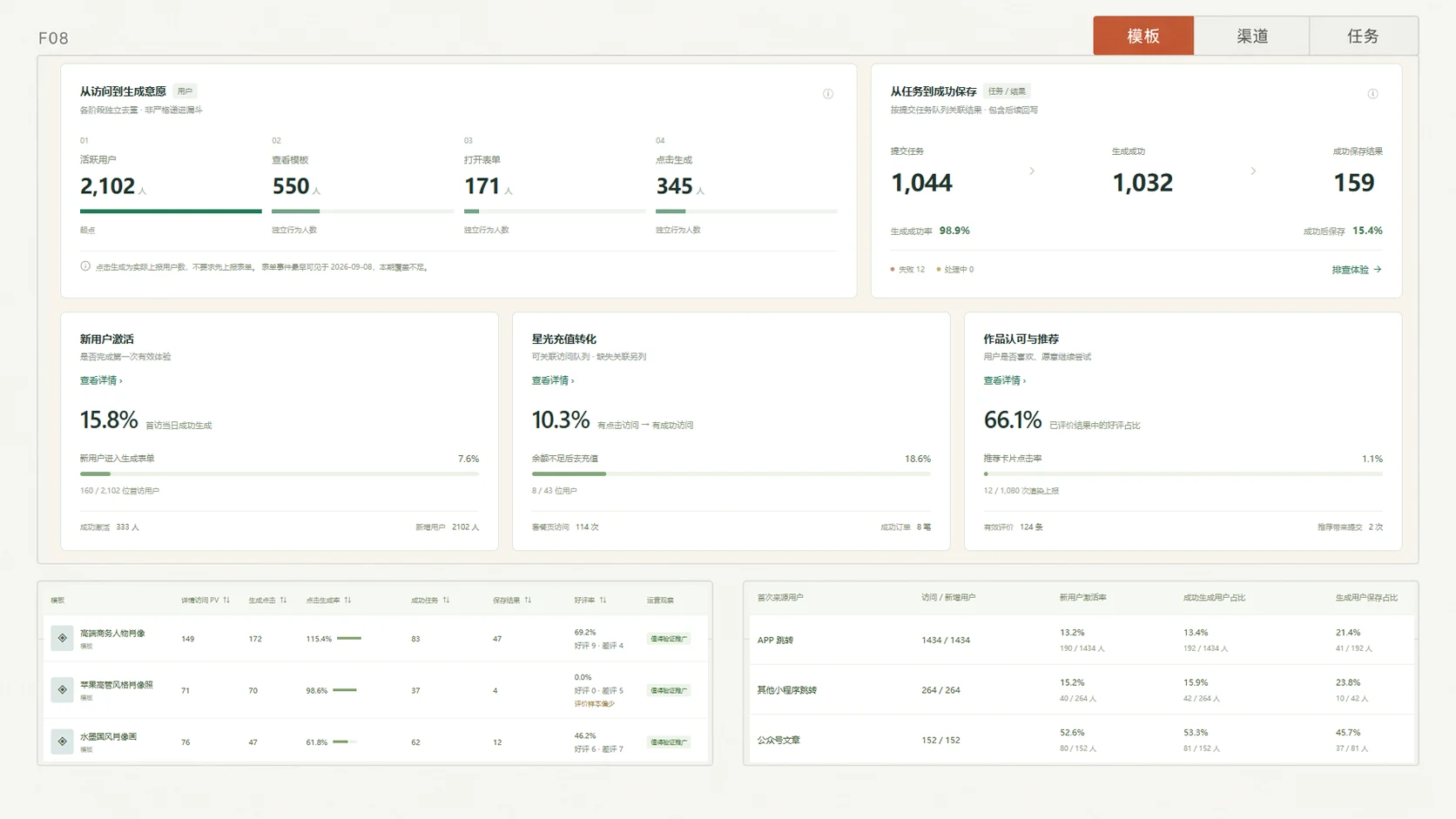
FEATURE / 08
Trace the journey from discovery to saving
- Instrument detail visits, generation clicks, submitted tasks, success and failure, and original or HD saving.
- The dashboard organizes data by template, channel and task performance to locate drop-off points.
- Distinguish intent from completion, and separate experience friction, audience fit and model failures.
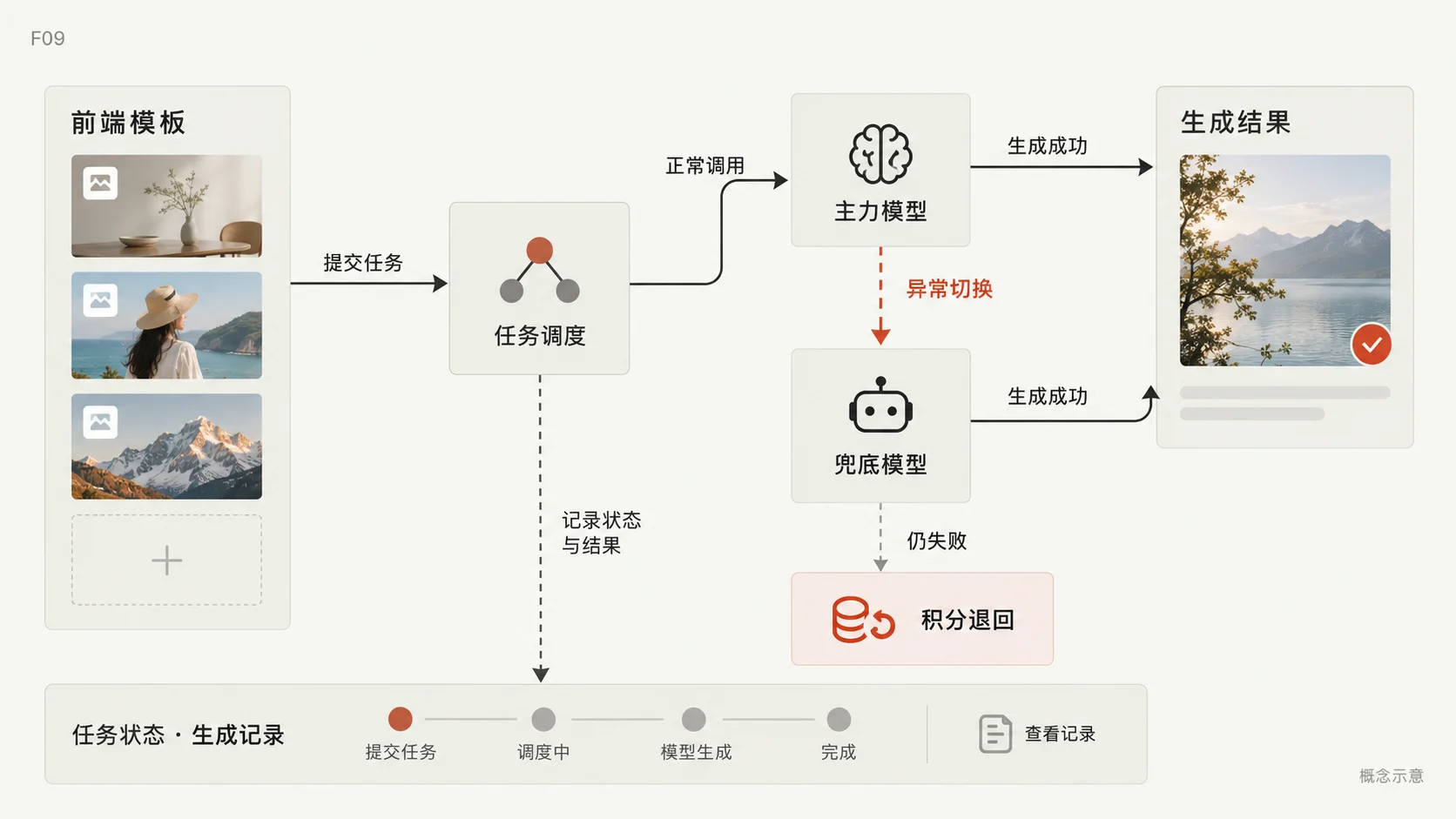
FEATURE / 09
Primary and fallback models for resilience
- Decouple model capabilities from frontend templates and configure primary and fallback models for alternative execution paths.
- Task states, history and failure compensation support both delivery and recovery.
- Design for recovery as well as successful generation, so users can understand a failure and continue.
03 / SELECTED TEMPLATES
Specific scenes, recognizable needs
Templates are both creation tools and a way to communicate with users, spanning keepsakes, school preparation and professional identity.

TEMPLATE / 01
Cute ceramic figurines
Mothers / Couples
Rounded shapes, ceramic texture and relationship-led scenes turn personal photos into collectible-style characters. The template found an audience among mothers and couples for family keepsakes and shared portraits.
Focus: recognizable subjects, ceramic texture and emotional expression.
- Generation rate
- 44.7%
- Satisfaction
- 87.5%

TEMPLATE / 02
School-entry portraits
Parents
A straightforward child portrait template for a specific moment: preparing for school. Back-to-school promotion through official-account content reached parents with an immediate image need.
Focus: a clear use case, simple inputs and seasonal demand.
- Generation rate
- 47.7%
- Satisfaction
- 74.5%

TEMPLATE / 03
Apple-executive-inspired portraits
Professionals / Job seekers
A restrained studio style offers an alternative to conventional corporate portraits. Clothing, background color and framing can be adjusted for different contexts while retaining the subject’s recognizable identity.
Focus: natural presence, consistent lighting and configurable professional styling.
- Generation rate
- 98.6%
- Satisfaction
- 66.8%

TEMPLATE / 04
Premium business portraits
Working professionals
Designed around a mature professional presence, promoted with a playful “Journey to the West characters as executives” concept. The campaign drew interest and use from mid-career professionals, connecting template design with creative promotion.
Focus: business styling, personal presence and a memorable campaign idea.
- Generation rate
- 115.4%
- Satisfaction
- 69.2%
Generation rate = generation clicks / detail visits × 100%.
04 / LEARNING & NEXT STEPS
Keep building after launch
Experience includes invisible work
Beyond interface design, I worked on home-screen requests, deferred noncritical tasks, batched card rendering and image caching. The aim is to make content available before secondary work. Candidate improvements in the records still require continued device validation.
From shipping to understanding repeat use
The product is live and gathering feedback across templates. Interest in an individual template does not yet establish stable paid conversion. Template performance, channel fit, repeat use and actual purchases will inform the next stage of audience and business-model validation.
NEXT / 01 · PLANNED
Onboarding: a smoother first creation
Add introductory tasks and contextual guidance through selection, inputs, generation and saving, then refine the flow using first-session completion.
NEXT / 02 · PLANNED
AI video: extend still images into motion
Plan to integrate AI video generation, retaining example-led discovery and simplified inputs for personal creation and business content.
Implementation & tools
- Trae → Cursor → Codex
- WeChat / WXML / WXSS
- JavaScript
- Cloud Functions
- Model API
- Real-ESRGAN
Project links

Zhang Yi Zhang
WeChat game · Independent development
Combining charged jumps, fictional trading and a little chive character through independent game design, visual direction, development and platform adaptation.
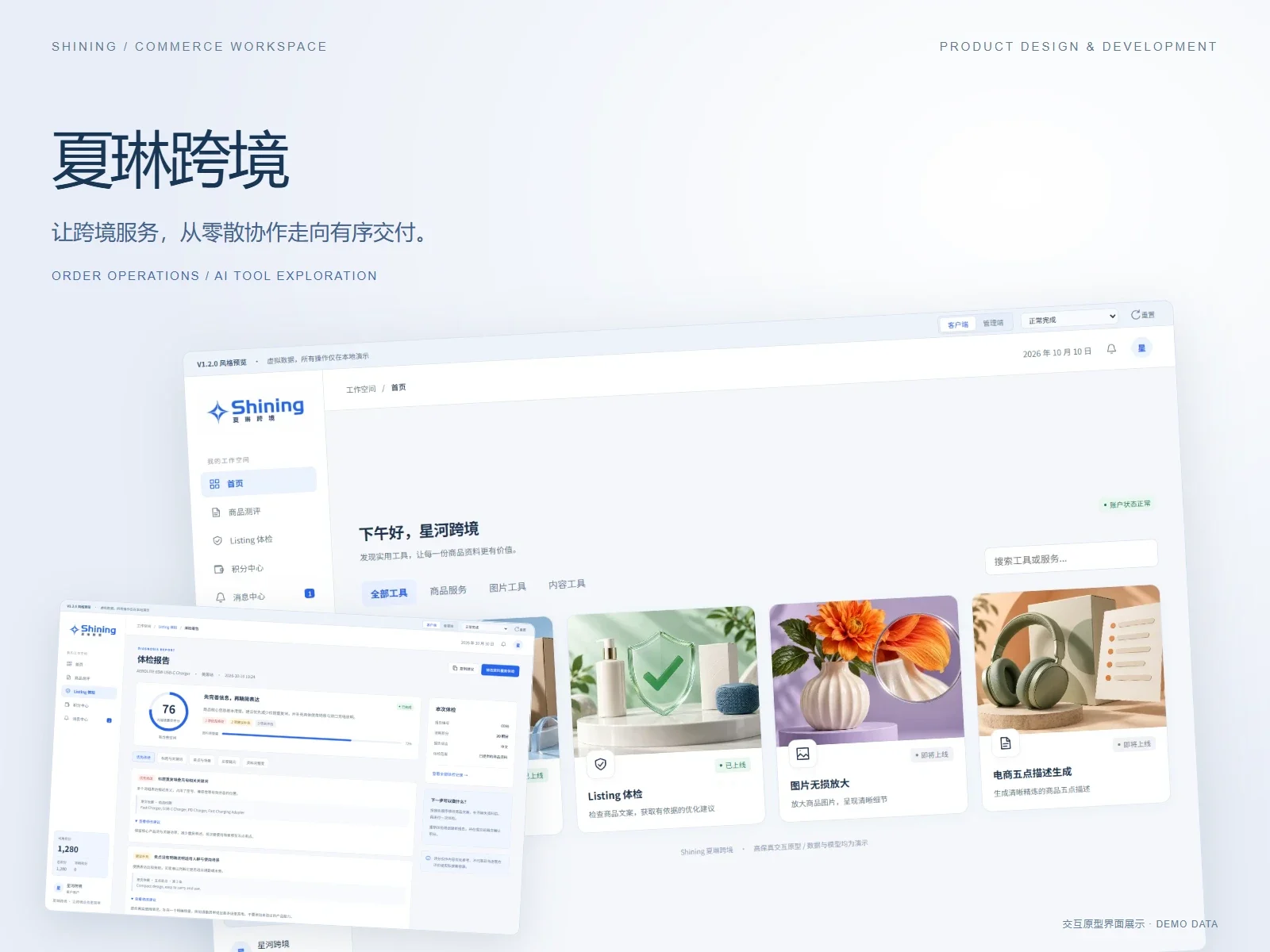
Xialin Commerce
Business platform · Three-person collaboration
A commerce service platform connecting customers and operators through orders, credits and batch delivery, with a Listing Doctor and AI service center extension design.
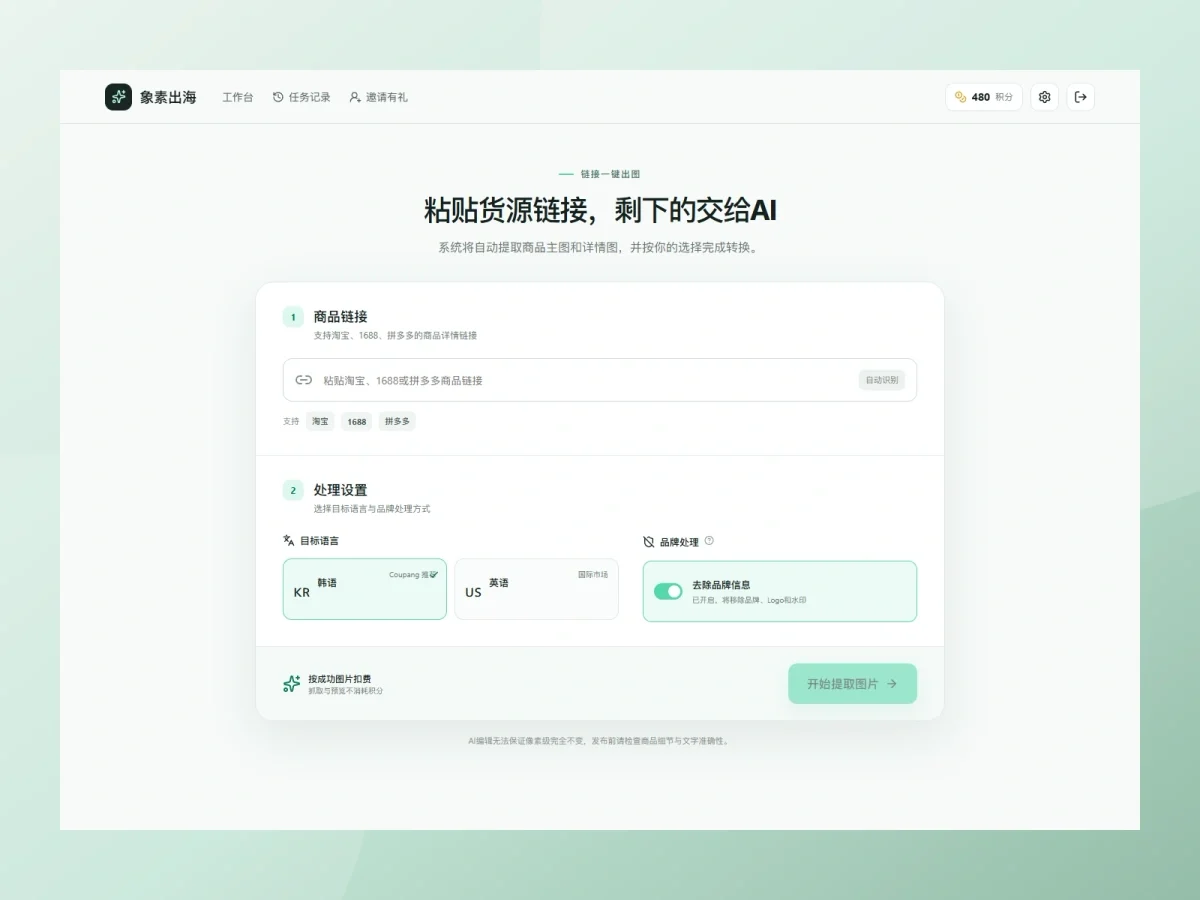
Xiangsu Overseas
AI commerce tool · Independent development
A product-image workspace for cross-border sellers: source extraction, image selection, Korean/English localization and batch delivery. Independently designed and developed; v1 in development.