Xialin Commerce.
Connecting cross-border service operations, from request to delivery.
Requirements coordination / Design / Development / Maintenance

Xialin product interfaces · Composed prototype captures with demonstration data and AI behavior
01 / COMMERCE, CONNECTED
From scattered requests
to connected delivery.
Xialin Commerce is a cross-border commerce service project with two former colleagues. I own requirements coordination, product design, development and maintenance, connecting product information, order progress, credit charges and delivery results in a shared workspace.
LinkOrder provides the order collaboration foundation, with the product evolving toward a workspace of specialized tools. This case combines business implementation in the H001 branch with interaction designs for Listing Doctor and the AI service center.
- Collaboration
- Three-person team
- My contribution
- Requirements / Design / Build / Maintain
- Product structure
- Customer + Admin workspace
- Direction
- Order operations → AI tools
02 / PEOPLE & SCENARIOS
Connect three everyday perspectives
Target users and scenarios inferred from the business workflow.
Cross-border sellers & brands
Multiple products and markets need more than repeated status checks.
Submit product information, follow orders and results, and track credits in one place. The AI extension connects listing issues to actionable edits.
FOCUS / Visibility · Content qualityCommerce service operators
Scattered requests and spreadsheet handoffs slow delivery.
Bring customers, orders and results together. Keep familiar Excel handoffs while adding preview validation, version history and feedback resolution.
FOCUS / Batch operations · TraceabilityBusiness owners & platform managers
Growing services need consistent access, pricing and configuration.
Use shared accounts, credits, messaging and audit records across tools. The AI prototype extends this approach to model connections and request policies.
FOCUS / Consistency · Extensibility03 / SYSTEM ARCHITECTURE
Two workspaces. One shared foundation.
A modular monolith separates role-based interfaces, reuses platform capabilities and keeps order data connected.
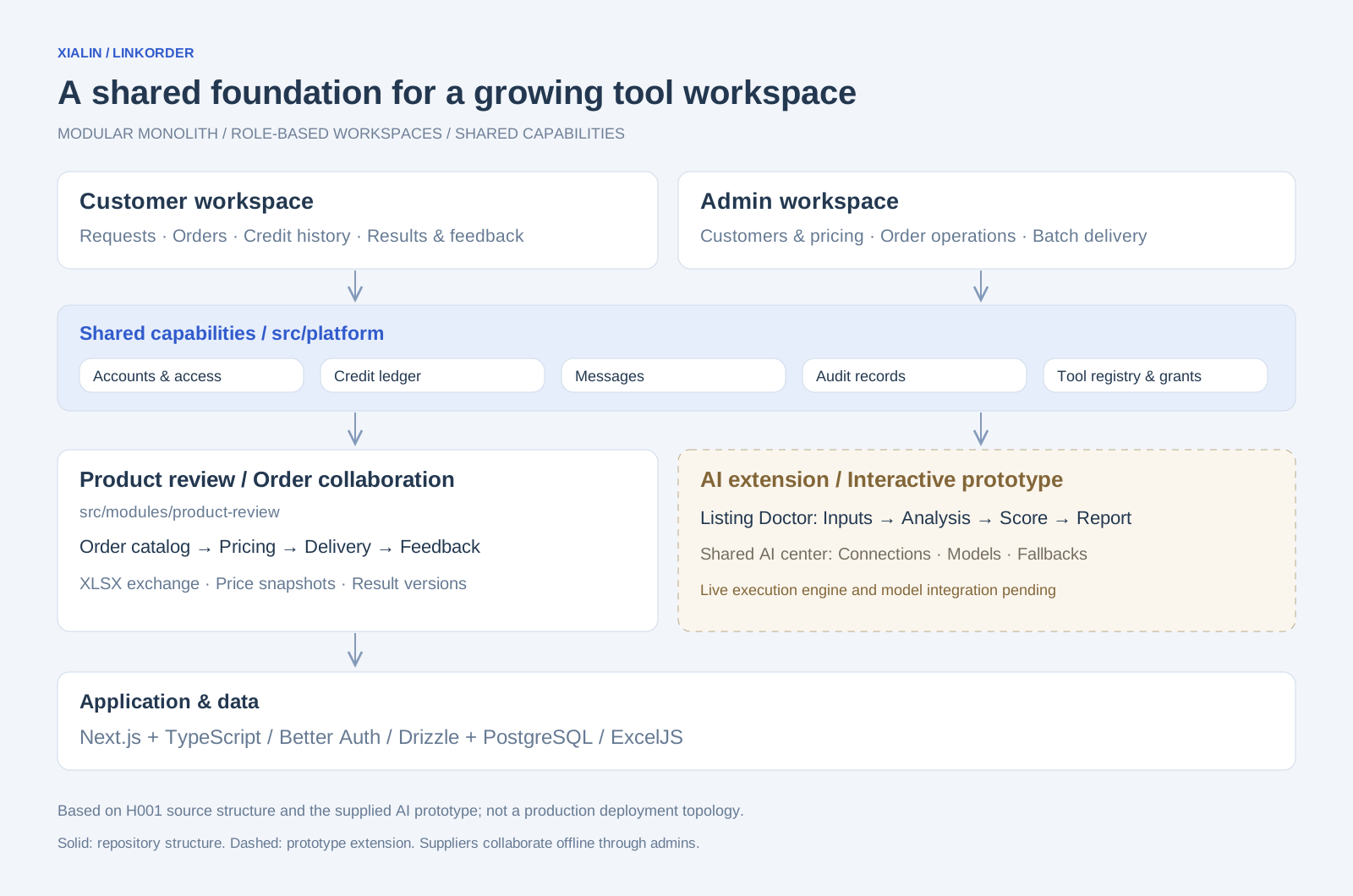
Roles
Customers submit and track requests. Admins handle customers, pricing and delivery. Suppliers collaborate offline through admins; there is no separate supplier portal.
Shared platform
Accounts, credits, messages, audit and tool access are platform capabilities reused by specialized tools.
Application & data
Next.js and TypeScript power the app, Better Auth handles authentication, Drizzle and PostgreSQL store records, and ExcelJS supports spreadsheet exchange.
04 / BUSINESS WORKFLOW
Connect the full delivery journey
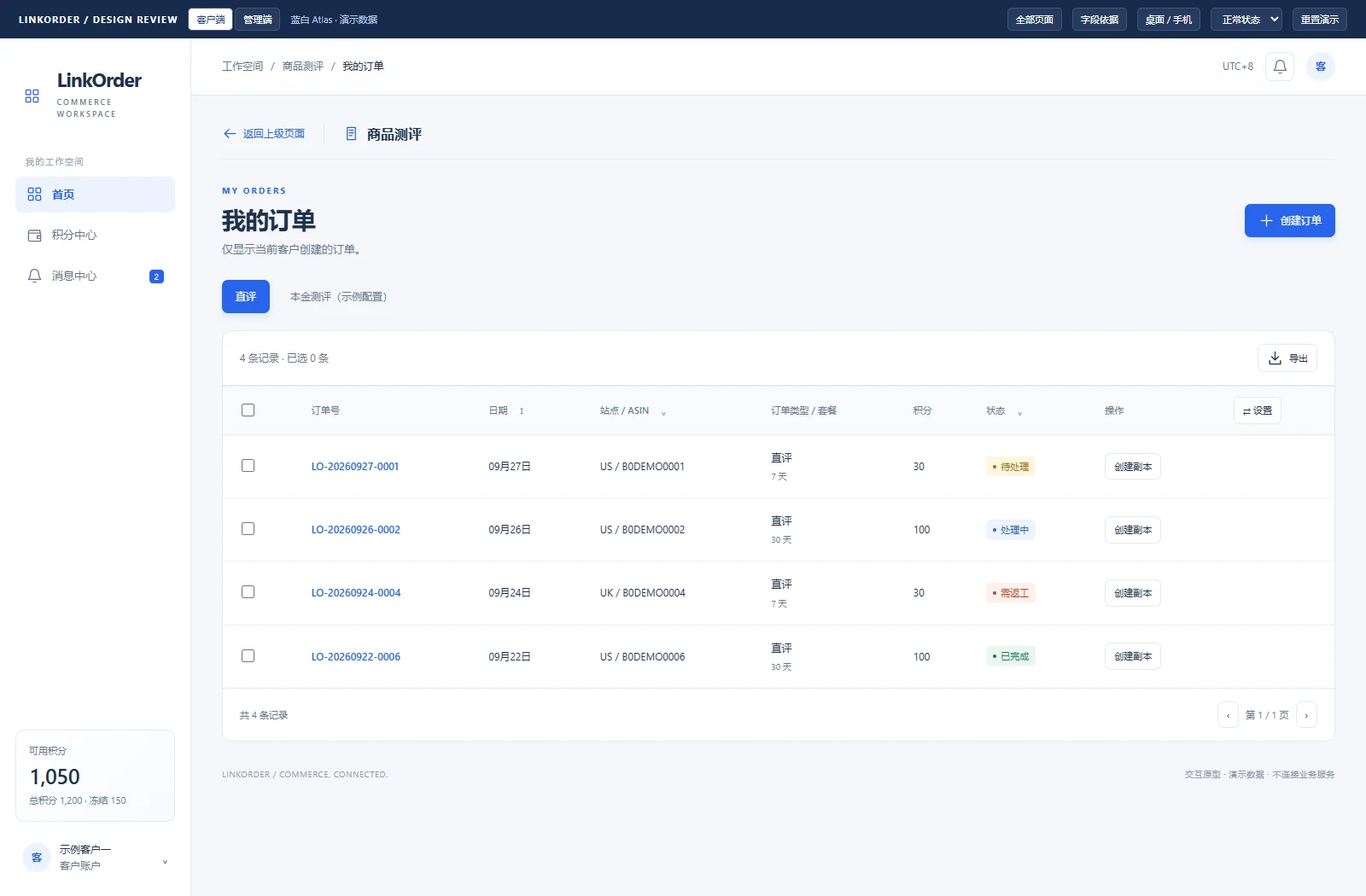
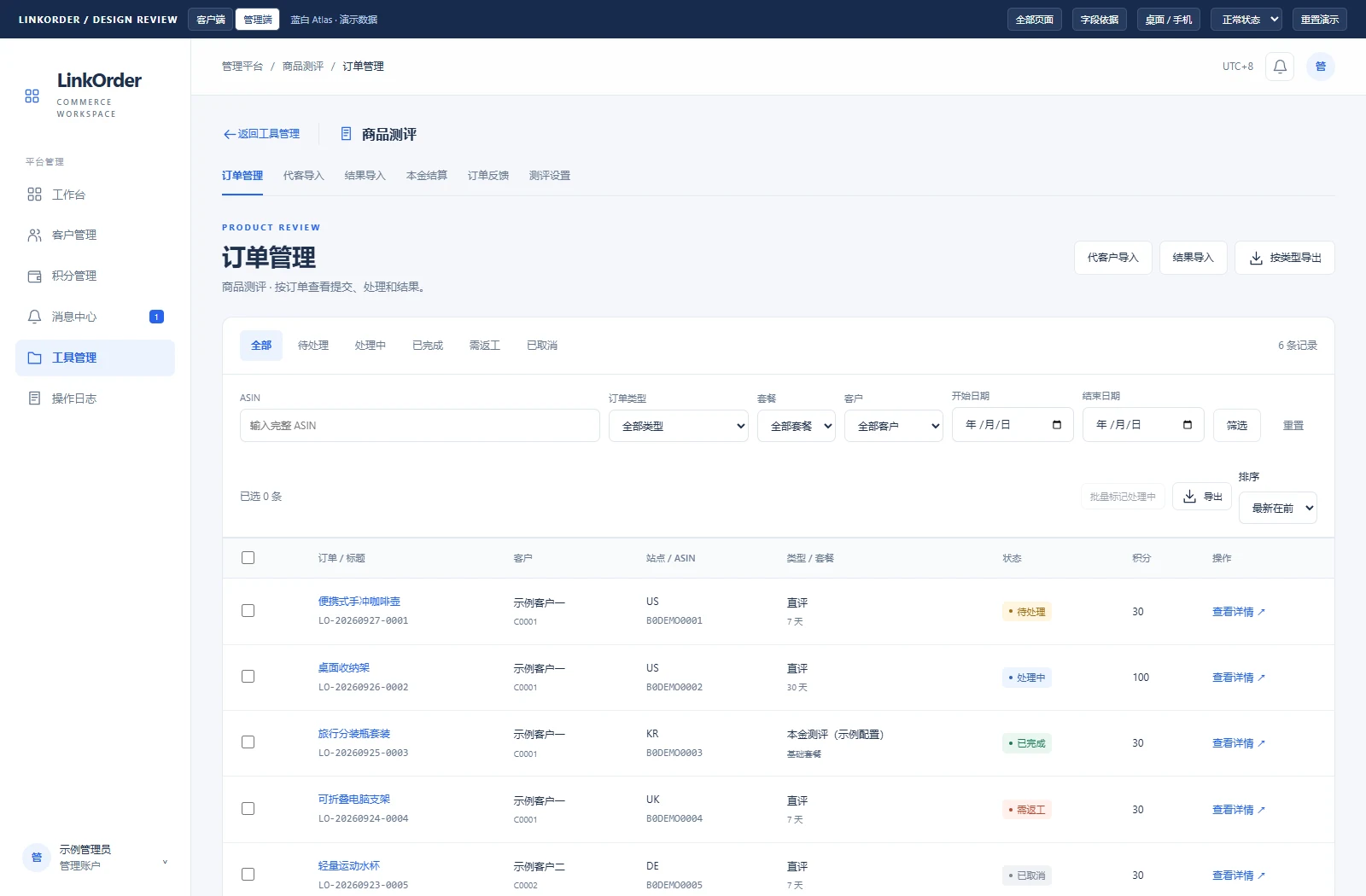
Four connected stages around a shared order record. The features below are supported by H001 implementation; screenshots illustrate the interaction design.
- 01Submit product data→
- 02Price & create order→
- 03Process & deliver→
- 04Review & feedback↗
FEATURE / 01
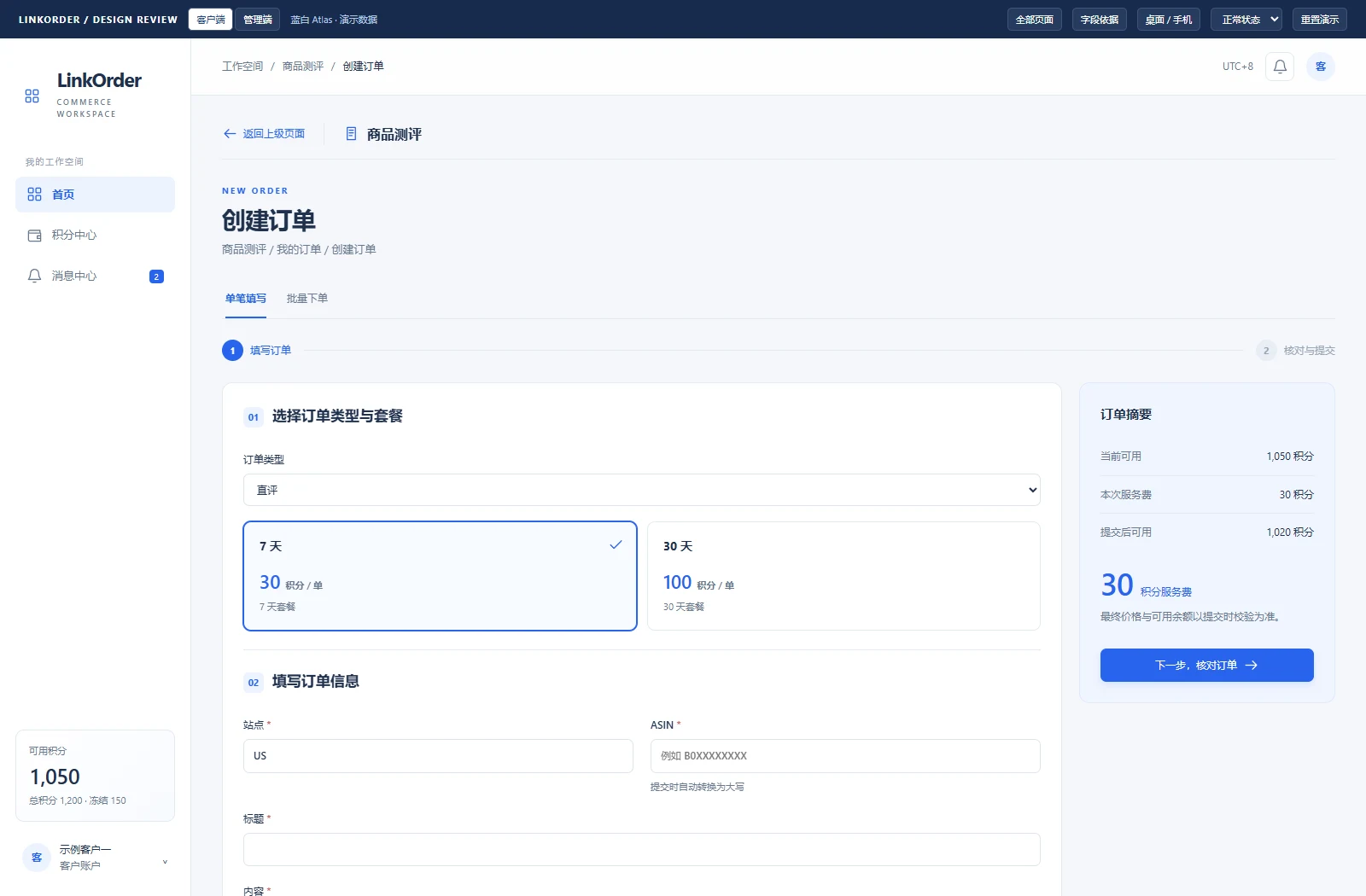
Turn service requests into structured orders
Move from scattered messages to requests that can be validated and priced.
- Customers select an order type and package. Catalog mode supports configurable fields, images and dates.
- Single and batch ordering share server-side access, pricing and balance checks at confirmation.
- Orders preserve field, package and price snapshots so later configuration changes do not rewrite history.
FEATURE / 02
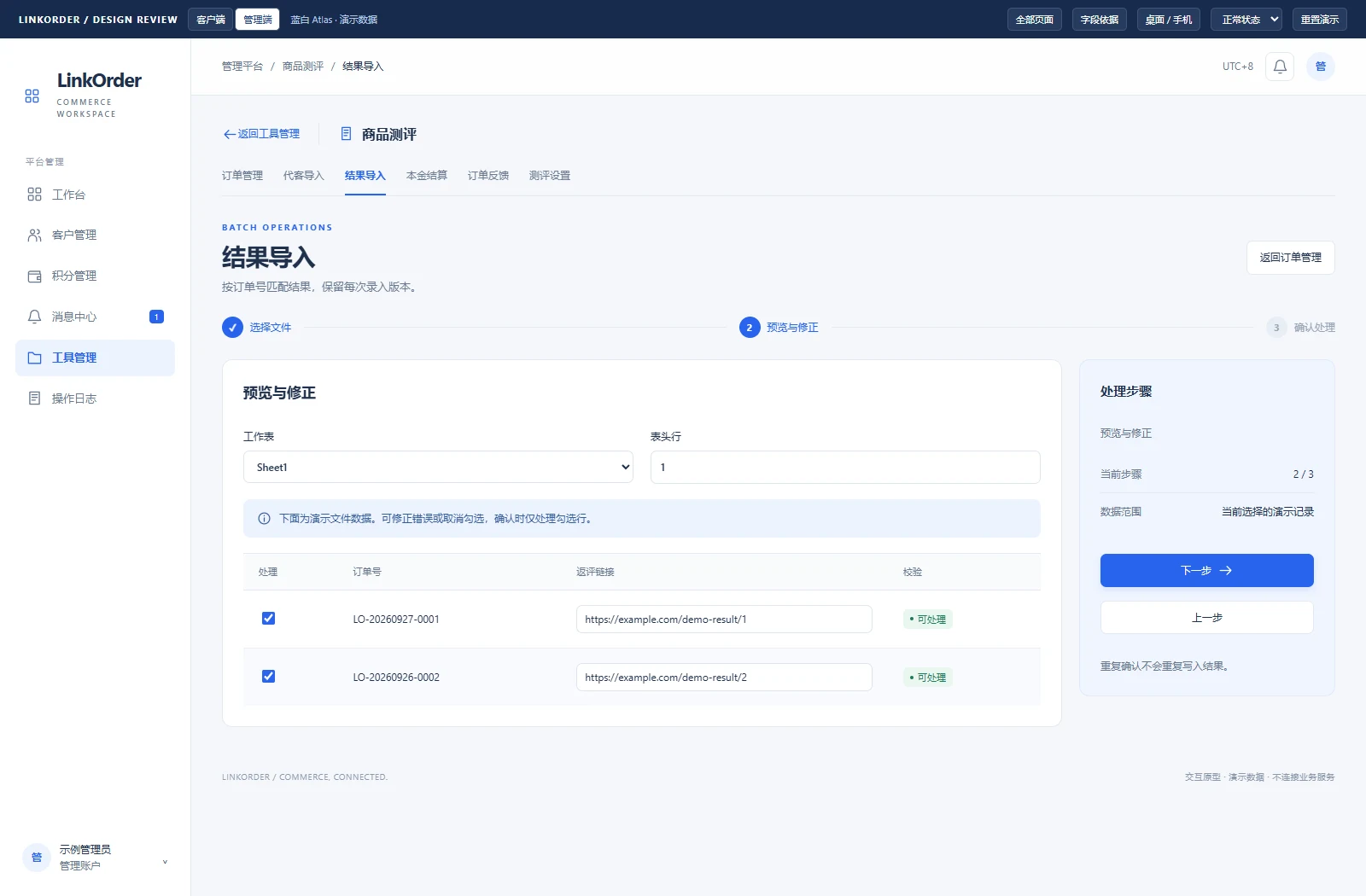
Keep Excel, bring structure to batch delivery
Respect existing workflows while validating data before it is written.
- Export by order type and match returned results by order number to reduce manual copying.
- Preview the import, correct or exclude invalid rows, then commit changes transactionally.
- Server-side limits cover file size and rows, rejecting unsupported formulas, macros and external links.
FEATURE / 03
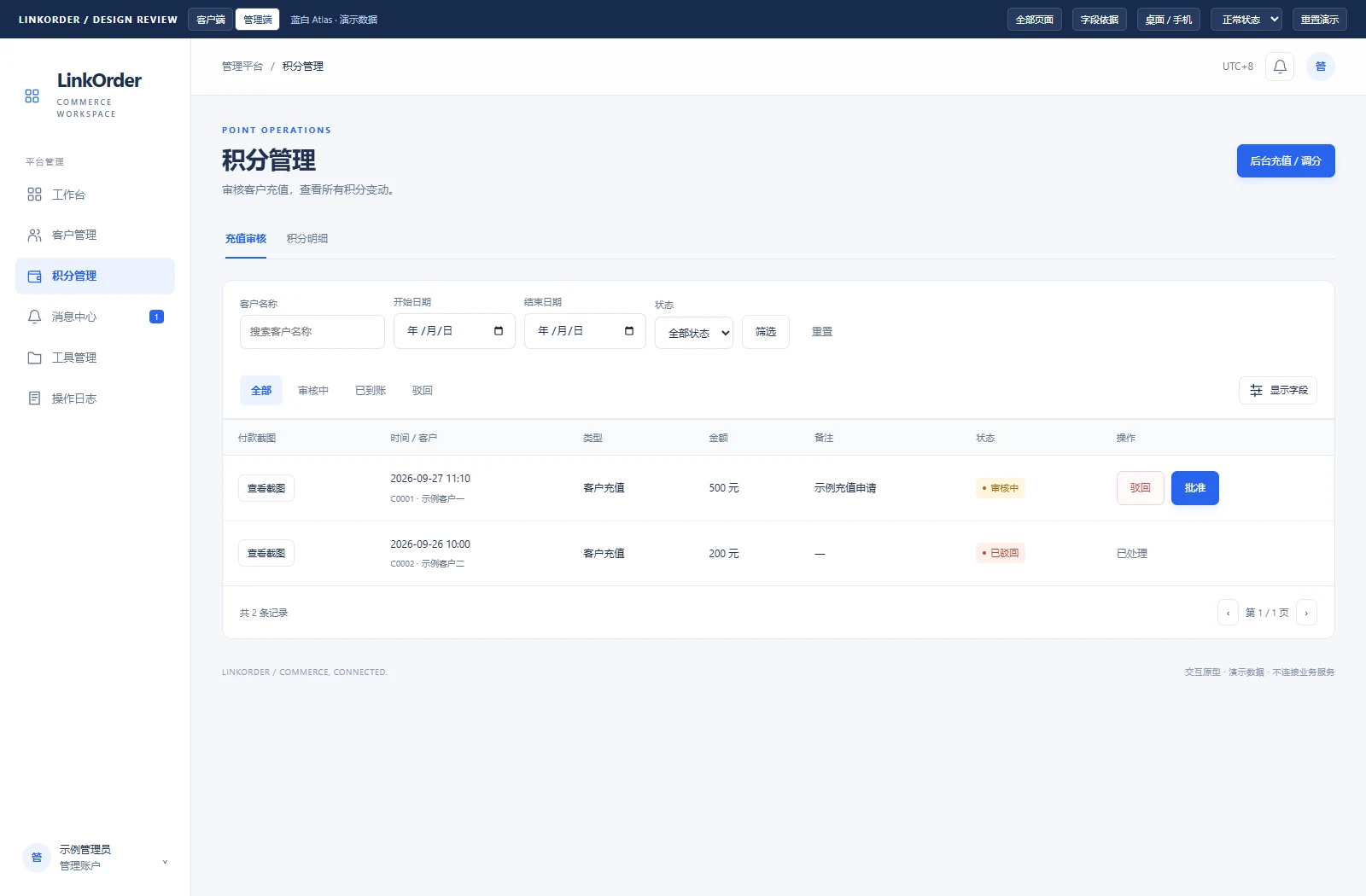
Give every credit movement a business context
Connect charges, top-ups and after-sales adjustments in a shared ledger.
- Customers see balances and transactions; admins manage top-ups and adjustments with recorded history.
- Credit charges and order creation commit together; batch submission recalculates totals and available balance.
- Refunds and manual adjustments retain business context for reconciling orders and the ledger.
FEATURE / 04
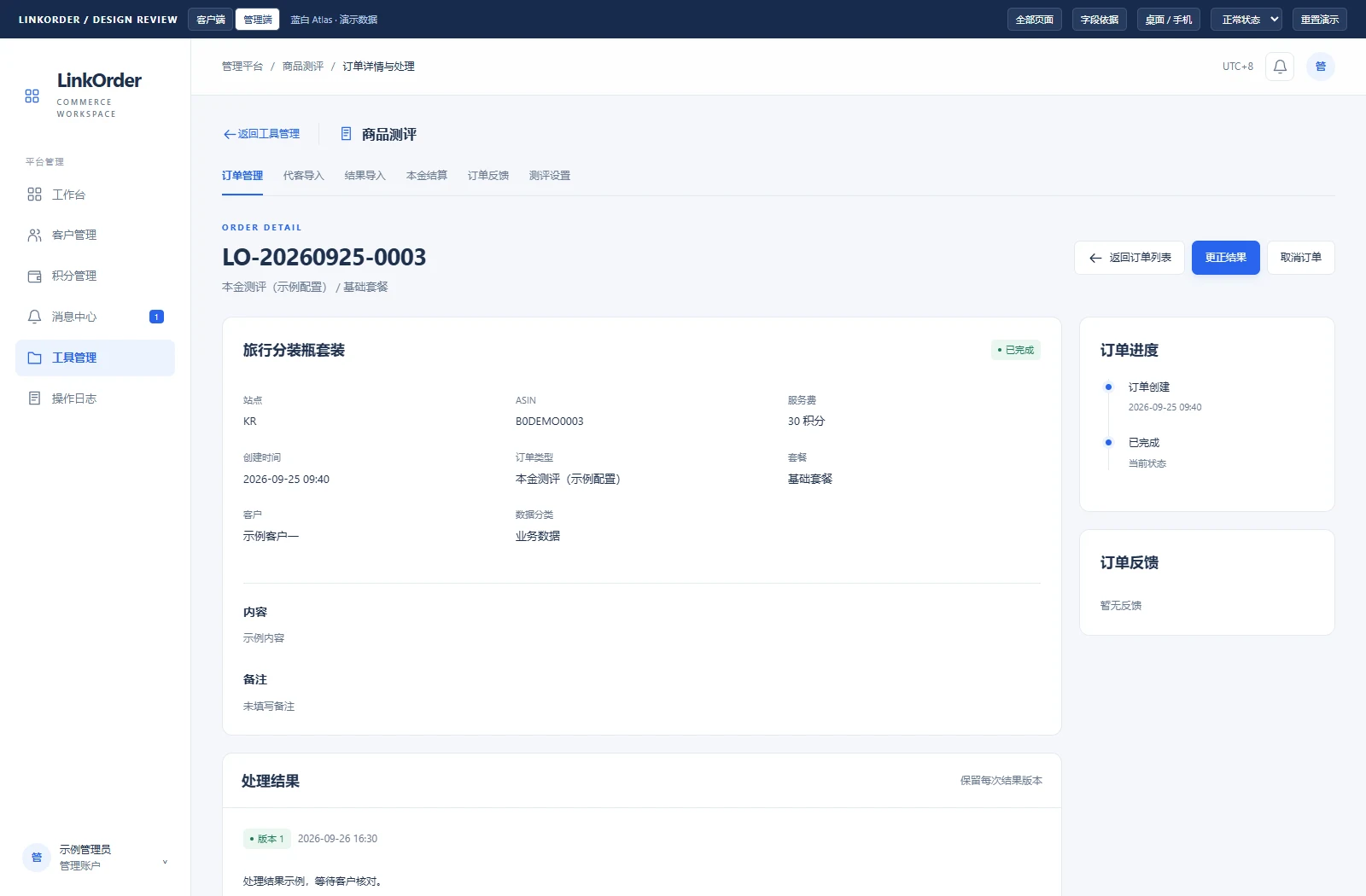
Keep results and feedback connected after delivery
Completion is more than a status label: it is a delivery record that can be revisited.
- Pending, processing, completed and reopened states connect customer and admin workflows.
- Results accept links or text. Later submissions append immutable versions and preserve previous deliveries.
- Customers can raise feedback on completed orders; admins resolve, reopen or refund as appropriate.
05 / NEXT / AI WORKSPACE
Extend services into intelligent tools
Extension design · Listing Doctor is the second home card, with the compliance checker removed. Image upscaling and bullet generation remain upcoming tools in the prototype.
Users focus on what to improve. The platform organizes how.
Clear forms and evidence-based reports make the customer experience approachable. In the admin workspace, business steps, model resources and request policies are organized separately for reuse across future tools.
FEATURE / 05
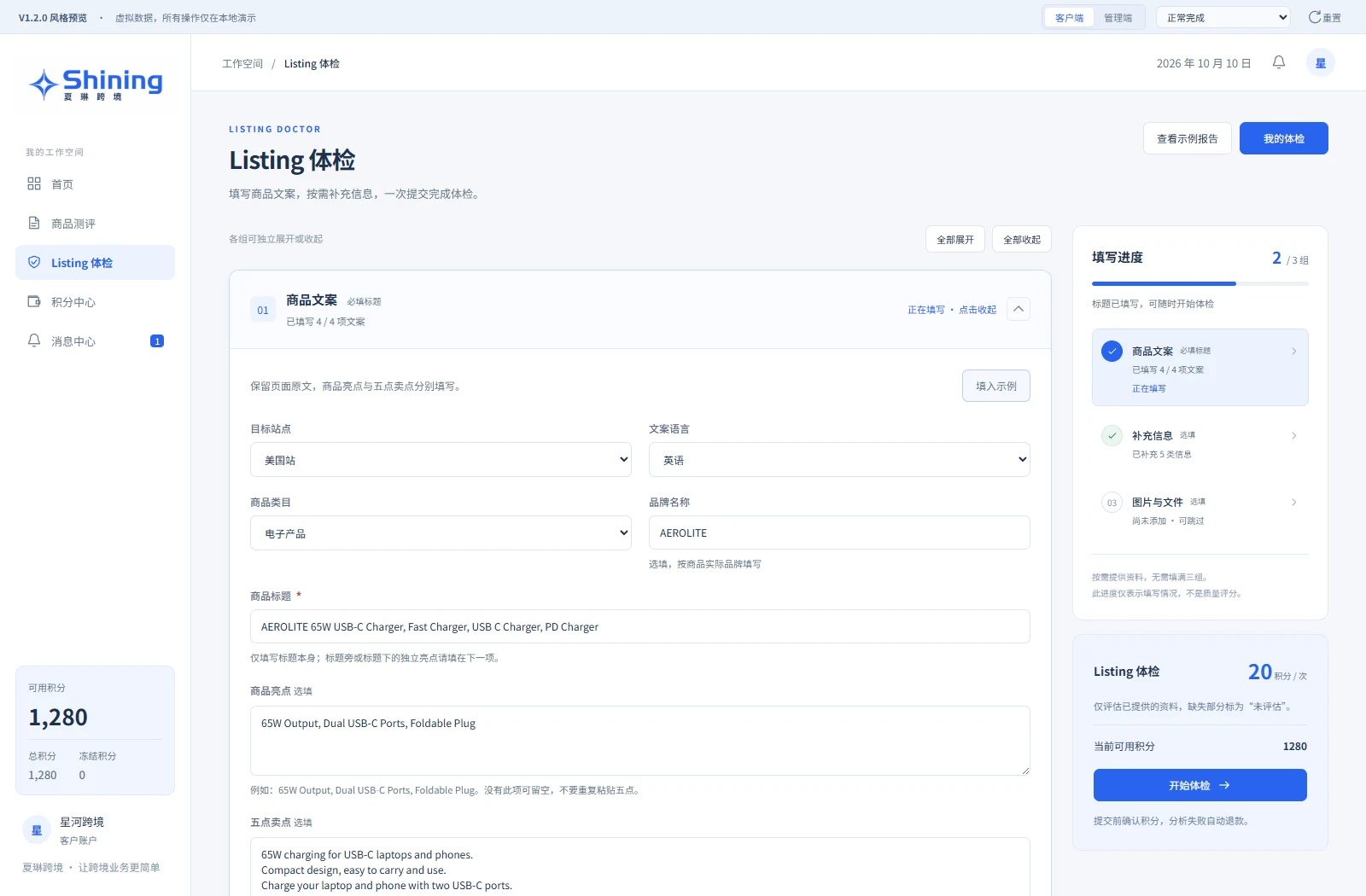
Listing Doctor starts with the source material
Organize titles, selling points, descriptions and supporting material into one review task.
- Provide copy for a target marketplace, language and category, with required and optional inputs distinguished.
- Show preparation status and credit cost before submission so users understand the review scope.
FEATURE / 06
Explain the issue and show what to change
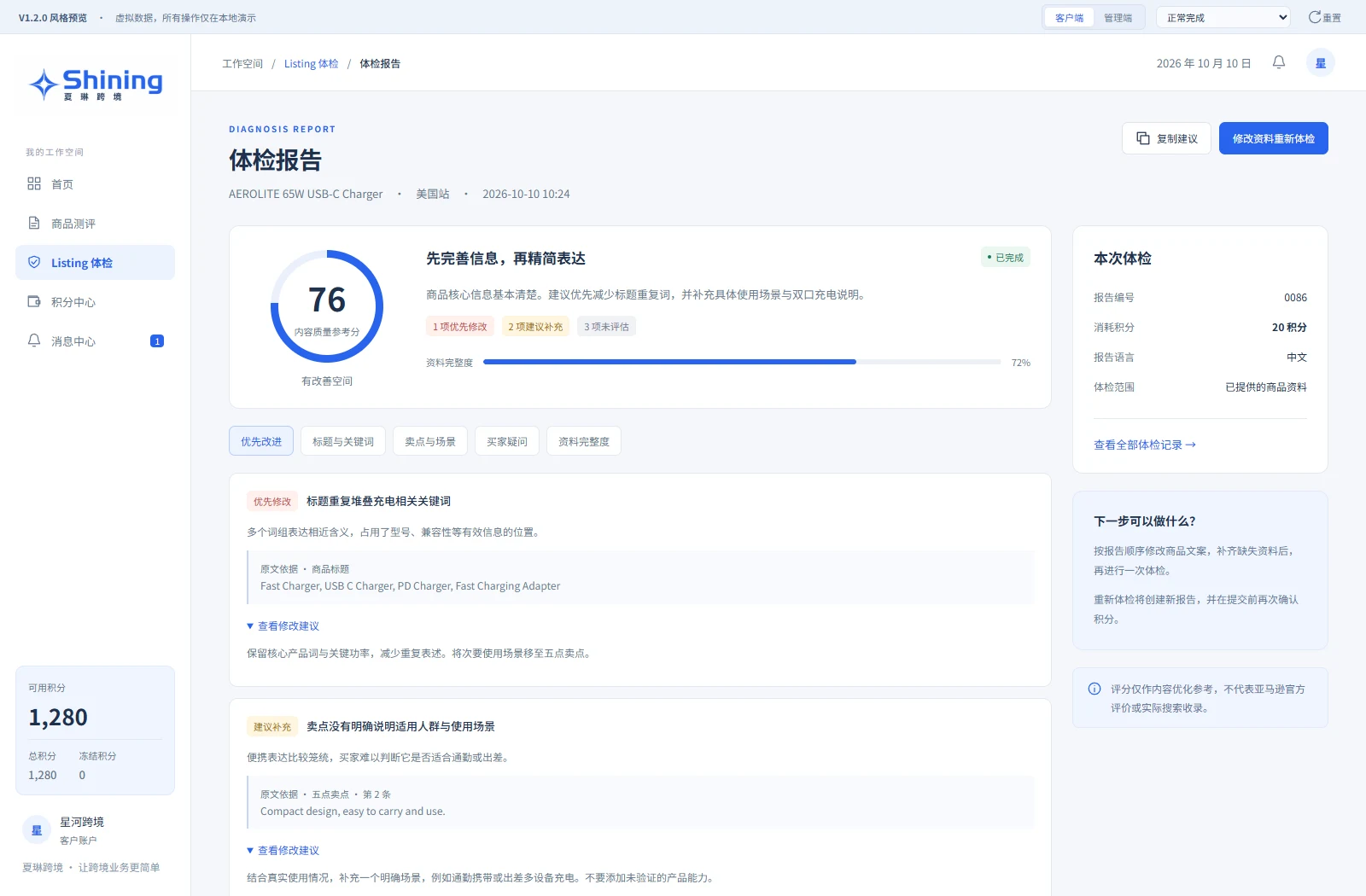
Turn an abstract score into prioritized advice grounded in the original copy.
- Group findings by title and keywords, selling points and scenarios, and buyer questions, highlighting priorities.
- Link advice to source text, mark missing material as unevaluated, and support copying suggestions and running a new review.
FEATURE / 07
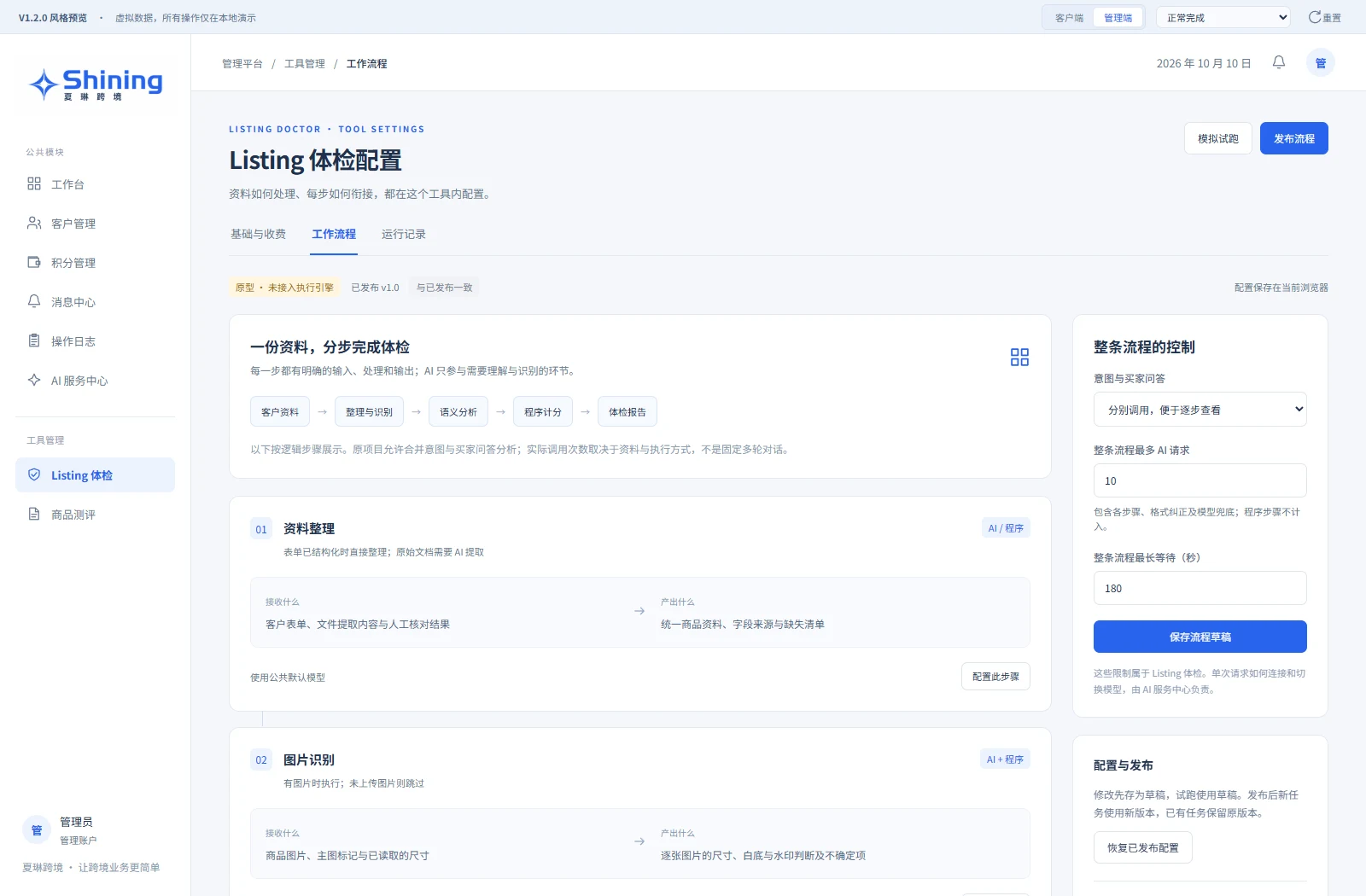
Configure business steps within the tool
Break a complex AI task into understandable, configurable steps.
- Organize material, recognize images, analyze meaning, calculate scores and produce a report, with explicit inputs and outputs.
- Drafts, simulated trials, published versions and request/time limits make execution boundaries visible in the prototype.
FEATURE / 08
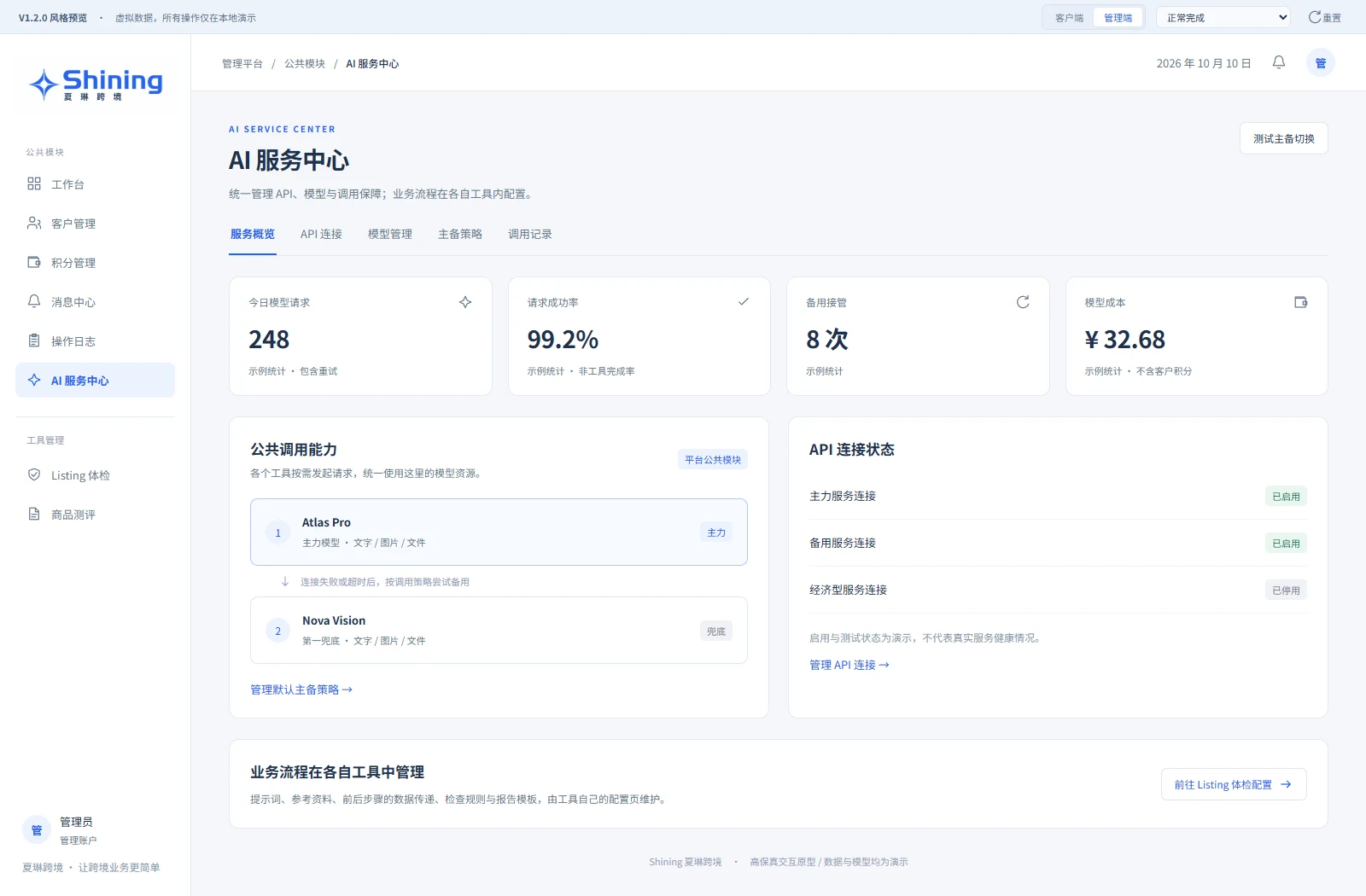
Manage shared model capabilities centrally
Separate shared model resources from tool-specific workflows to support future expansion.
- The AI service center brings API connections, model capabilities, fallback policies and request logs together.
- Tools use shared models as needed. The prototype illustrates failover and cost visibility using demonstration statistics.
DESIGN → BUILD → ITERATE
Translate business understanding into every delivery step.
My role spans requirements, workflow design, frontend and backend development, and ongoing maintenance. The focus extends beyond clear interfaces: access, pricing, batch validation and history must become workflows users understand and teams can operate.
The business platform is live and evolving. This case describes the specified branch, without equating prototype behavior or branch features with the current production version. The AI extension still needs an execution engine, live model integration and outcome validation.
Implementation & tools
- Next.js
- TypeScript
- Better Auth
- Drizzle ORM
- PostgreSQL
- ExcelJS

Ai Dream Studio
AI product · Independent development
From design to independent delivery: refined prompt templates and simple inputs make AI image creation more approachable.

Zhang Yi Zhang
WeChat game · Independent development
Combining charged jumps, fictional trading and a little chive character through independent game design, visual direction, development and platform adaptation.

Xiangsu Overseas
AI commerce tool · Independent development
A product-image workspace for cross-border sellers: source extraction, image selection, Korean/English localization and batch delivery. Independently designed and developed; v1 in development.